#Communicators (SSH)
A communicator is the channel the build uses to talk to the running VM while provisioning it. It is the mechanism for uploading files and executing scripts inside the guest. After the VM boots, the build needs a way to reach in and run things; the communicator is that connection.
It sits between two phases:
- Boot: the VM comes up (ISO or cloud image, plus any boot command) and brings up its network and SSH daemon.
- Provision: file and shell provisioners run inside the guest over the communicator.
SSH is the only supported communicator.
#In the editor
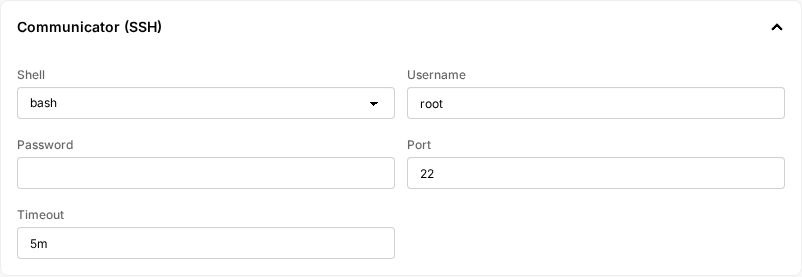
Each VM has a Communicator (SSH) section. Set:
- Shell:
bashfor Linux/BSD/macOS guests,powershellfor Windows guests. This controls how files are uploaded and how scripts are executed. Get it wrong and provisioners break in subtle ways. - Username: the guest user the build connects as. For cloud images this is
debian,ubuntu,cloud-user,fedora, etc., depending on the distro. For ISO installs, it is whichever user your preseed or Autounattend creates. - Password: optional. Used in addition to keys when set.
- Port: default
22. - Timeout: how long to wait for SSH to come up. Be generous; ISO installs especially can take 30 minutes to an hour before SSH is ready. A too-short timeout fails the build.
#Reference
communicator:
    type: ssh # default
    shell: bash # bash | powershell, default bash
    ssh_username: debian # default "root"
    ssh_port: 22 # default 22
    ssh_password: '' # optional, used in addition to keys
    ssh_timeout: '5m' # how long to wait for SSH to come up; default 5m
To pre-set a known SSH keypair (e.g. for debugging), use ssh_private_key_secret to reference a Secret containing your key. Otherwise the build generates a fresh keypair per build and discards it. This field is reachable only by editing the YAML directly.
| Guest OS | shell value |
|---|---|
| Linux, BSD, macOS | bash |
| Windows | powershell |
#Communicator vs. boot command
These two cover different windows in the build:
- Use boot commands for anything that has to happen before SSH exists: typing at the BIOS/GRUB menu, dismissing "Press any key to boot from CD", pointing an installer at a preseed/kickstart URL. It works by typing keystrokes into the VM's VNC console, so it is the only option when there is no OS (or no networking) to connect to yet.
- Use the communicator for everything after the OS is up and SSH responds: copying files, running shell or PowerShell scripts, installing packages. This is where provisioners do their work.
Rule of thumb: if you can express the step as a script, do it over the communicator. Reserve boot commands for the parts of installer UX that only accept keystrokes.