#Writing a Rubric
A rubric is the grading specification for a module. It tells the autograder which commands to run on the student's VM and how to convert the output into points. You author it in the rubric editor on the module's library page.
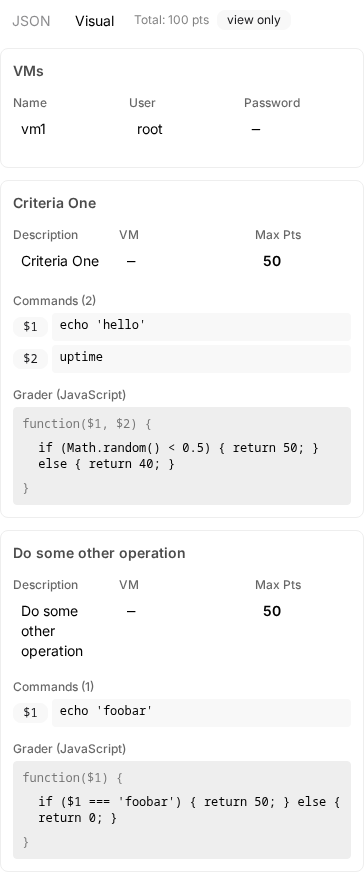
#Anatomy
A rubric has two parts:
- VM credentials. The username and password the autograder uses to log in. With one VM, you supply a single user and password. With multiple VMs, you list each VM by name and give each its own credentials. The names must match the VM names in the module manifest.
- Scoring components. An ordered list. Each component is one criterion that runs independently and contributes points to the total.
#Component fields
Every component has four fields.
| Field | What it is |
|---|---|
description | Short label shown to the student and the teacher. Make it specific so a glance tells you what is being checked. |
maxPoints | The score awarded when the criterion fully passes. Fractions are allowed, so a criterion can be worth 2.5. |
commands | A list of shell commands to run on the VM. The output of each command is captured and handed to the grader. |
grader | A snippet of JavaScript that decides how many points to award. |
In a multi-VM rubric, each component also has a vm field naming which VM its commands run on.
#The grader function
Each command's standard output is passed to your grader as a positional argument: the first command becomes $1, the second $2, and so on. The grader runs as the body of a function and must return a finite number. That number is the points awarded for the component. Nothing caps it at maxPoints, so a grader that returns more than the criterion is worth will hand out more than the criterion is worth.
return $1.includes('OK') ? 25 : 0;
A few rules to keep in mind:
- If a command exits non-zero, its argument is the literal string
'NONZERO_EXIT_CODE'instead of stdout. Test for that explicitly when a failing command should still produce a graded result. - The grader runs in an isolated sandbox. There is no
console, no network, no filesystem, noprocess. Built-ins likeMath,RegExp,JSON, andNumberare available. - Limits: 250 ms of CPU time and 16 MB of memory per component. A grader that times out or returns anything other than a finite number scores zero and surfaces the error in the result.
- Partial credit is fine, and it does not have to be a whole number. Return any value between
0andmaxPoints, including2.5or0.25. The component scores you return are summed and the student's total is stored rounded to two decimal places.
#Single VM vs. multiple VMs
Use the single-VM form when the entire module runs on one machine. Use the multi-VM form when the lesson involves a client and a server, two roles in a network exercise, or any setup where commands must reach different hosts. The autograder dispatches each component's commands to the named VM.
#Using recipes
Most checks are variations on a few ideas: a file exists, a file contains some text, a user exists or has a password, a service is running, the firewall is on. Instead of writing commands and a grader for these, click + From Recipe Component in the rubric editor (or + From Script Component to write the commands and grader yourself) and pick one from the catalog. You fill in a few settings (a path, a username, a port) and the editor compiles the recipe into the commands and grader the autograder runs. Open Compiled commands on the component to see exactly what will run.
Recipes work across operating systems. Each one compiles for the shell of the VM the component runs on: Bash for Linux and macOS VMs, PowerShell for Windows VMs. The shell comes from the VM's communicator.shell in the module manifest, and a VM cloned from a base build inherits it from the base. If that guess is wrong, override it with the Shell picker in the VMs row.
A few things to know:
- Checks can point either way. Many recipes have an Expect setting, so the same recipe grades "the file exists" or "the malware is gone", "the user exists" or "the rogue account was removed". A check that cannot tell, for example because its command failed, never awards points in either direction.
- Lists give partial credit. Settings such as Users or Phrases take a comma-separated list (
Joe, Julie, Brenda, Bill). Each entry is checked separately and earns its share of the points. - Explicit points. Each recipe component has Points if it passes and Points if it fails. Passing points are what the component adds to the rubric total. Failing points are usually 0; make them negative for a penalty, for example pass 0 and fail -20 on "Firewall enabled" for "the student did not just switch the firewall off". Partial results land in between, and a check that cannot run scores 0.
- Recipes are pinned. A component keeps compiling from the recipe version it was saved with, so grades never change behind your back. When a recipe is improved, the component shows Update to vN. Click it to adopt the new version, then save.
- Convert to custom turns a recipe component into ordinary commands and a grader that you can edit freely. Use it when a recipe almost fits.
- Some recipes need privileges. Checks such as "user has a password" and "user can read file" read protected system state, so on Linux the rubric's grading user needs root or
sudo. The recipe's description says when this applies.
In JSON, a recipe component carries a recipe field next to its compiled commands and grader:
{
	"description": "MOTD contains a welcome message",
	"recipe": {
		"slug": "file-contains-text",
		"version": 1,
		"params": { "path": "/etc/motd", "text": "welcome" },
		"passPoints": 10,
		"failPoints": 0
	}
}
Saving compiles the commands and grader for you, and sets maxPoints from passPoints. Leave out version to pin the latest.
#Examples
#Example 1: a single check on one VM
A simple criterion: did the student leave the file at /etc/motd containing the word welcome?
{
	"user": "student",
	"password": "rudder",
	"rubric": [
		{
			"description": "MOTD contains a welcome message",
			"maxPoints": 10,
			"commands": ["cat /etc/motd"],
			"grader": "return $1.toLowerCase().includes('welcome') ? 10 : 0;"
		}
	]
}
#Example 2: combining multiple commands and partial credit
Two commands feed one component. The grader awards full credit when both checks pass and half credit when only one does.
{
	"user": "student",
	"password": "rudder",
	"rubric": [
		{
			"description": "SSH service is enabled and listening on port 22",
			"maxPoints": 20,
			"commands": ["systemctl is-enabled ssh", "ss -tlnp | grep ':22 '"],
			"grader": "var enabled = $1.trim() === 'enabled'; var listening = $2.includes(':22'); if (enabled && listening) return 20; if (enabled || listening) return 10; return 0;"
		}
	]
}
#Example 3: a multi-VM rubric
A client and a server. The server must serve content on port 80, and the client must be able to reach it.
{
	"vms": [
		{ "name": "server", "user": "admin", "password": "rudder" },
		{ "name": "client", "user": "user", "password": "rudder" }
	],
	"rubric": [
		{
			"vm": "server",
			"description": "nginx is running on the server",
			"maxPoints": 15,
			"commands": ["systemctl is-active nginx"],
			"grader": "return $1.trim() === 'active' ? 15 : 0;"
		},
		{
			"vm": "client",
			"description": "Client can fetch the homepage from the server",
			"maxPoints": 15,
			"commands": ["curl -s -o /dev/null -w '%{http_code}' http://server/"],
			"grader": "return $1.trim() === '200' ? 15 : 0;"
		}
	]
}
#Tips
- Prefer commands that produce a small, predictable output. Match against a single token rather than parsing a paragraph.
- Use regular expressions when the output varies but follows a pattern.
- Keep components independent. A failing first component should not break a later one.
- Write the description from the student's perspective. "Firewall blocks inbound port 23" reads better than "iptables rule check 1".
- When a rubric misbehaves at runtime, see Troubleshooting.